
Using roslyn for static analysis
Roslyn, also known as the .NET Compiler Platform, is a set of open-source compilers and code analysis APIs for C# and VB.NET developed by Microsoft. It provides tools for parsing, analyzing, and compiling code, making it easier for developers to build code-focused tools and applications, such as static analyzers.
Installation
Roslyn is available as a nuget package called Microsoft.CodeAnalysis. Some tutorials recommend to install Microsoft.Net.Compilers, but this package is now deprecated and results in build errors such as this:
abedford@thinkpad:/re/scan$ dotnet build
Microsoft (R) Build Engine version 16.6.0+5ff7b0c9e for .NET Core
Copyright (C) Microsoft Corporation. All rights reserved.

    Determining projects to restore...
    Restored /re/scan/Re.Scan.csproj (in 189 ms).
    Microsoft.CSharp.Core.targets(59,5): error MSB6006: "csc.exe" exited with code 1.

Build FAILED.

    Microsoft.CSharp.Core.targets(59,5): error MSB6006: "csc.exe" exited with code 1.
    0 Warning(s)
    1 Error(s)

Time Elapsed 00:00:00.95
So Microsoft.Net.Compilers should be ignored.
Visual Studio
If you are using Visual Studio, open the package manager console (Tools > NuGet Package Manager > Package Manager Console) and execute the following command:
Install-Package Microsoft.CodeAnalysisIt is also recommended to install the .NET Compiler Platform SDK. It provides useful templates:
- Diagnostic with Code Fix: To create a defect detecting Visual Studio extension.
- Code Refactoring: To create a code refactoring Visual Studio extension.
- Stand-Alone Code Analysis Tool: To create a stand-alone command line application that can generate/analyze/transform C#/VB code.
It includes a syntax visualization tool which really comes in handy when developing AST checkers: 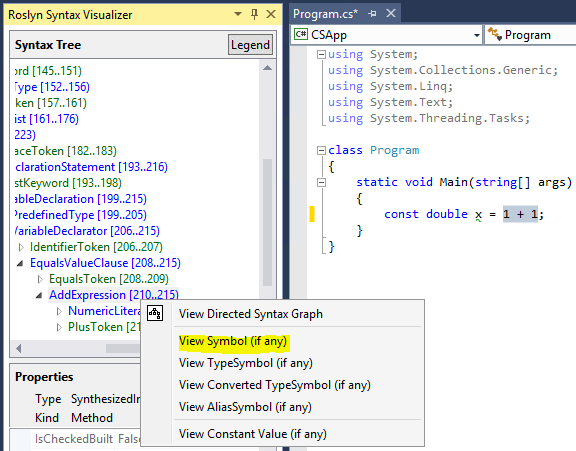
.NET Core
If you are using .NET Core, which is what I am going to use for the rest of this post, you can add it to your project by executing the following command in the root of your project:
dotnet add Microsoft.CodeAnalysisLoading a project for analysis
Roslyn includes the Workspace API, which allows users to load projects and solutions using only a few lines of code with MSBuildWorkspace:
using Microsoft.CodeAnalysis.CSharp;
using Microsoft.CodeAnalysis.MSBuild;

// ...

const string projectPath = @"C:\Path\To\Project.csproj";
var workspace = MSBuildWorkspace.Create();
var project = workspace.OpenProjectAsync(projectPath).Result;
var compilation = project.GetCompilationAsync().Result;
However, MSBuildWorkspace is only available on Windows at the moment (October 2020). For cross-platform development, the best alternative appears to be Buildalyzer, which can be added to a project by executing:
dotnet add package BuildalyzerSimilarly to MSBuildWorkspace, Buildalyzer performs a design-time build of the project using msbuild. A design-time build is a special build that retrieves all the necessary information to analyze the project (such as source files, references, compilation options, etc.), but stops short of actually compiling the project and emiting a binary on disk.
using Buildalyzer;

...

AnalyzerManager manager = new AnalyzerManager();
IProjectAnalyzer analyzer = manager.GetProject(@"/Path/To/Project.csproj");
IAnalyzerResults results = analyzer.Build();

// Print the paths of the project's source files
string[] sourceFiles = results.First().SourceFiles;
foreach(var s in sourceFiles) {
    Console.WriteLine(s);
}
In addition to the sources files, the AnalyzerResults class also exposes the references, the project references, the target framework and build properties. Buildalyzer also includes an extension which adds support for creating Roslyn workspaces:
dotnet add package Buildalyzer.Workspacesusing Buildalyzer.Workspaces;
// ...
AnalyzerManager manager = new AnalyzerManager();
ProjectAnalyzer analyzer = manager.GetProject(@"/Path/To/Project.csproj");
AdhocWorkspace workspace = analyzer.GetWorkspace();Syntax analysis
Let's put projects aside for now, and focus on syntax analysis. Suppose that we want to analyze the following program:
using System;

namespace HelloWorld
{
    class Hello {
        static void Main(string[] args)
        {
            Console.WriteLine(""Hello World!"");
        }
    }
}
More specifically, that we want to print out the AST of this program (useful if you don't have access to the .NET Compiler Platform SDK). The easiest way to do this is to create a CSharpSyntaxWalker. Syntax walkers can be used to visit, in a depth-first order:
- the syntax nodes of the AST by overriding
Visit(SyntaxNode node), - the tokens by overriding
VisitToken(SyntaxToken token), - trivia (i.e., comments and whitespace) by overriding
VisitTrivia(SyntaxTrivia trivia).
string sourceCode = @"
    namespace HelloWorld
    {
        class Hello {
            static void Main(string[] args)
            {
                System.Console.WriteLine(""Hello World!"");
            }
        }
    }";

SyntaxTree tree = CSharpSyntaxTree.ParseText(sourceCode);
var walker = new PrintASTWalker();
// We can pass any SyntaxNode to the SyntaxWalker and it will visit the
// node and its descendants.
walker.Visit(tree.GetRoot());

public class PrintASTWalker : CSharpSyntaxWalker
{
    int indentation = 0;
    public override void Visit(SyntaxNode node)
    {
        indentation++;
        var indents = new String(' ', indentation);
        Console.WriteLine($"{indents}{node.Kind()}");
        base.Visit(node);
        indentation--;
    }
}
Which will output the following tree:
CompilationUnit
  NamespaceDeclaration
   IdentifierName
   ClassDeclaration
    MethodDeclaration
     PredefinedType
     ParameterList
      Parameter
       ArrayType
        PredefinedType
        ArrayRankSpecifier
         OmittedArraySizeExpression
     Block
      ExpressionStatement
       InvocationExpression
        SimpleMemberAccessExpression
         SimpleMemberAccessExpression
          IdentifierName
          IdentifierName
         IdentifierName
        ArgumentList
         Argument
          StringLiteralExpression
In addition to the node kind, we can easily display lots of useful information such as the text corresponding to a specific node (using node.GetText()) and its location in the source code (using node.GetLocation()).
Analysis
Roslyn's visitors can be used to traverse the syntax tree and identify code smells and potential problems. For example, we could detect resource leaks by looking for instances of IDisposable objects for which there is no call to Dispose() or that do not use using:
FileStream f = File.OpenRead("foo.txt");
f.Read(buffer, 0, 100);

// should be

using (FileStream f = File.OpenRead("foo.txt")) {
    f.Read(buffer, 0, 100);
}
One possible way to make it easier to query the syntax tree is to convert it to XML, supplement it with the information that we may need (e.g., location, type information) and then use LINQ to XML to find patterns.
Rewriting
Suppose that we want to detect cases where if statements have conditions of the form x == x (i.e., something that is always true), and that we want to replace the if statement with the body of the then block since the else block is never going to be executed.
public void Foo(int x, int y)
{
    if (x == x) {
        System.Console.WriteLine("Always True");
    }
    else {
        System.Console.WriteLine("Always False"); // Never executed
    }
}
Printing the AST reveals that the expression x == x is of type EqualsExpression and that the ElseClause is a child of the IfStatement:
...
    IfStatement : (3,20)-(5,21)
        EqualsExpression : (3,24)-(3,30)
        IdentifierName : (3,24)-(3,25)
        IdentifierName : (3,29)-(3,30)
        Block : (3,32)-(5,21)
        [...]
        ElseClause : (6,20)-(8,21)
        Block : (6,25)-(8,21)
...
To rewrite the AST, let us implement our own CSharpSyntaxRewriter. Like the CSharpSyntaxWalker, the CSharpSyntaxRewriter visits all the nodes, tokens and trivia of the AST.
public class IdentityComparisonRewriter : CSharpSyntaxRewriter
{
    public override SyntaxNode VisitIfStatement(IfStatementSyntax node)
    {
        if (node.Condition.IsKind(SyntaxKind.EqualsExpression)) {
            var operands = node.Condition.DescendantNodes().ToArray();
            var leftOperand = operands[0].ToString();
            var rightOperand = operands[1].ToString();
            if (leftOperand == rightOperand) {
                // we have found an if statement that has a condition of
                // the form `x == x`, so instead of returning `node`
                // as-is, we return the `then` block
                return node.DescendantNodes().First(x =>
                        x.IsKind(SyntaxKind.Block));
            }
        }
        return base.VisitIfStatement(node);
    }
}
Once defined, we can use this rewriter to rewrite our code snippet:
var rewriter = new IdentityComparisonRewriter();
var rewrittenCode = rewriter.Visit(root);
Note that CSharpSyntaxRewriter does not modify the original AST, it instead returns a new AST (called above rewrittenCode). When printing rewrittenCode, we obtain:
public void Foo(int x, int y)
{
    {
        System.Console.WriteLine("Always True");
    }
}